Having filed 3,000+ GST registrations for businesses across Delhi — from street vendors in Chandni Chowk to tech startups in Nehru Place — I know every rejection reason the department uses. The first question every business owner asks me is: Do I need GST registration?
GST Registration — from documents to GSTIN in 7 days
GST registration is mandatory when your aggregate annual turnover exceeds the prescribed threshold. But here is what most people miss — there are several categories where registration is mandatory regardless of turnover.
Official Reference: Section 22 of the CGST Act 2017 specifies the threshold limits. Section 24 lists 9 categories of persons who must register compulsorily regardless of turnover. Section 25 covers the registration process itself.
Category
Threshold (Annual Turnover)
Goods suppliers (normal states like Delhi)
₹40 lakh
Goods suppliers (special category states)
₹20 lakh
Service providers
₹20 lakh (₹10 lakh for special states)
E-commerce operators
No threshold — must register
Inter-state suppliers
₹20 lakh
Mandatory Registration — Regardless of Turnover
Even if your turnover is zero, you must register if you fall under any of these categories under Section 24:
Online information and database access providers (OIDAR)
TDS/TCS deductors under GST
Casual taxable persons
📍 Real Example — Nehru Place Freelancer
Priya, a freelance graphic designer in Nehru Place, earns ₹15 lakh/year. All her clients are in Delhi, so she does not need registration (below ₹20 lakh threshold). But when she got a ₹50,000 project from a client in Bangalore, she became an inter-state service provider — mandatory registration under Section 24. She registered within 30 days of the first inter-state invoice.
⚠️ Common Mistake: Many freelancers in Delhi think they can avoid GST by keeping income below ₹20 lakh. But if even one client is outside Delhi, Section 24 kicks in and registration is mandatory regardless of total turnover. The penalty for not registering is ₹10,000 or the tax amount, whichever is higher.
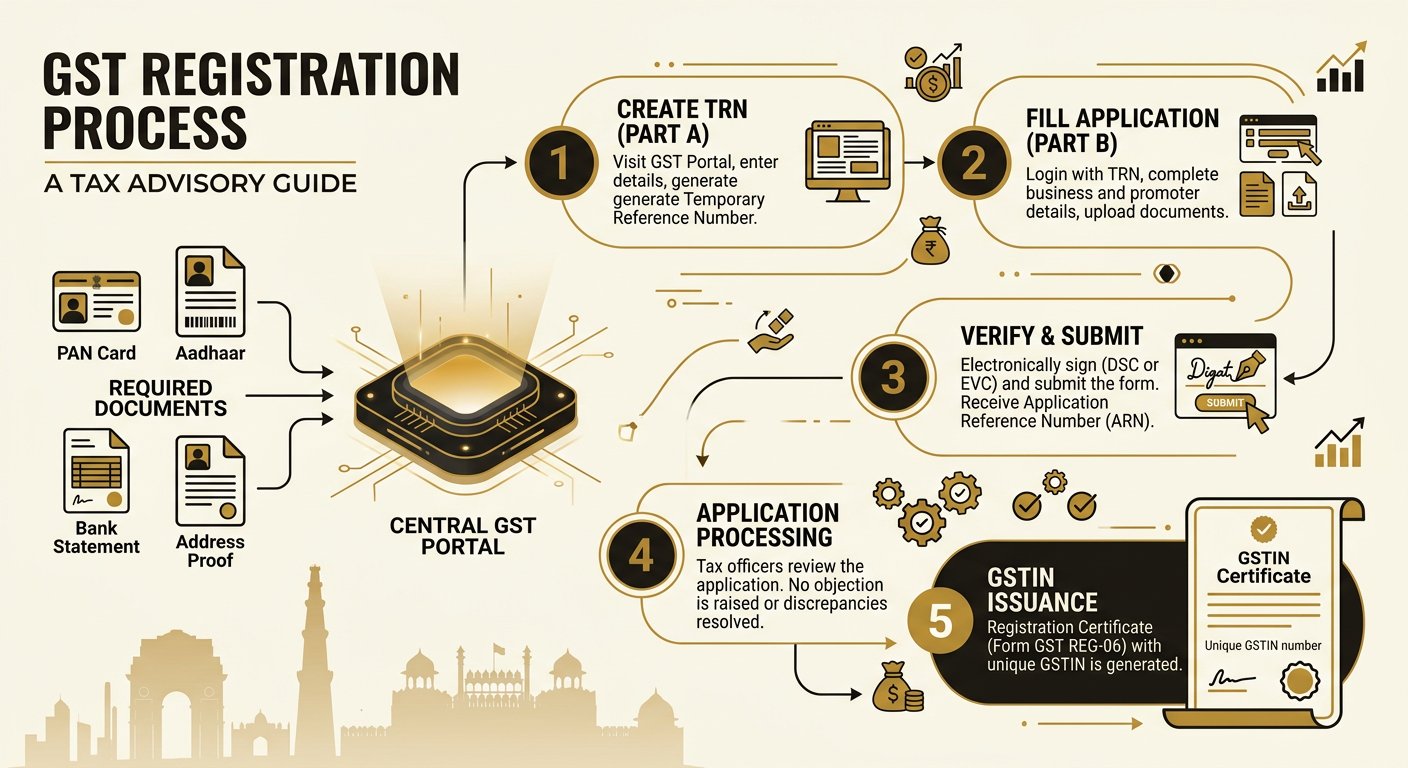
Documents Required for GST Registration
Before you start the application, keep these documents ready. I tell every client: "The application itself takes 30 minutes, but gathering documents takes 3 days." Do not start until you have everything.
Document
For
Format
PAN card
Proprietor / Partners / Directors
Scan copy
Aadhaar card
Proprietor / Partners / Directors
Scan copy
Business address proof
Registered office
Electricity bill / Rent agreement / NOC
Bank statement / cancelled cheque
Bank account details
JPG/PDF
Passport-size photo
Proprietor / Authorized signatory
JPG
Board resolution / Authorization letter
Companies / LLPs
PDF
Partnership deed / MoA / AoA
Firms / Companies
PDF
Digital Signature Certificate (DSC)
Companies / LLPs (optional for others)
USB token
📍 Real Example — Karol Bagh Shop Registration
A trader in Karol Bagh wanted to register his shop. His electricity bill was in the landlord's name, and the rent agreement had expired. I advised him to get: (1) A fresh rent agreement, (2) A NOC from the landlord on ₹10 stamp paper, (3) The landlord's electricity bill + a utility bill in the trader's name. With these 3 documents, the application was approved in 5 working days.
💡 Pro Tip from Parul: For rented premises, always include: (1) Valid rent agreement, (2) NOC from landlord, (3) Latest electricity bill. If the electricity bill is not in your name, add a supplementary document like a gas bill or mobile bill at the same address. This combination has never been rejected in my practice.
Step-by-Step GST Registration Process
This is the exact process I follow for every client. I have done this 3,000+ times, and this sequence minimizes rejections:
Visit gst.gov.in → Click "Services" → "Registration" → "New Registration"
Fill Part A: Enter state, legal name, PAN, email, and mobile number
Verify OTP sent to email and mobile
Receive Temporary Reference Number (TRN) — save this carefully, it is valid for 15 days only
Fill Part B using TRN within 15 days:
Business details and constitution
Place of business (principal + additional)
Goods and services with HSN/SAC codes
Bank account details
Upload all required documents
Submit application — digitally sign (DSC or Aadhaar OTP)
ARN generated — Application Reference Number for tracking
Proper Officer reviews — may raise queries within 3 working days
Clarifications (if any) — respond within 7 working days
GSTIN issued — 15-digit number within 3-7 working days
Official Reference: Rule 8 of the CGST Rules 2017 provides the detailed registration procedure. The proper officer must verify the application within 3 working days and the applicant gets 7 working days to respond to any queries.
📍 Real Example — Chandni Chowk Wholesale Business
A wholesale garment trader in Chandni Chowk applied online but got a query from the proper officer asking for "additional place of business proof." The trader had listed his godown in Gandhi Nagar as an additional place but uploaded the electricity bill for the main shop instead. I helped him upload the correct godown proof with NOC, and the GSTIN was issued within 4 days of the response.
Fees & Timeline
Government fee: NIL (GST registration is completely free on gst.gov.in)
Professional fee: ₹2,000-5,000 (if using a consultant like us)
Processing time: 3-7 working days (if all documents are correct)
GSTIN validity: Permanent (regular registration)
💡 Pro Tip from Parul: Do NOT pay anyone who claims they can 'expedite' your GST registration for a fee. The process is fully online and the timeline depends only on document accuracy and the proper officer's workload. A clean application gets approved in 3-5 days.
Common Registration Mistakes to Avoid
In my experience, these are the top 5 mistakes that cause rejections or delays:
Wrong business constitution — select correct entity type (proprietorship vs partnership vs company)
Incorrect HSN/SAC codes — verify with HSN master before entering
Address mismatch — ensure proof matches the address entered exactly
Not responding to queries — respond within 7 days or application may be rejected
⚠️ Common Mistake: The most common mistake I see in Delhi: using a residential address without proper documentation. If your registered office is at your home, you need an electricity bill in your name OR a rent agreement + NOC from the property owner. A simple Aadhaar card with the address is NOT sufficient as business address proof.
💡 Pro Tip from Parul: If you need help with GST registration in Delhi, I offer complete registration support including document review, application filing, and query response — all for ₹2,999. Call/WhatsApp: +91 95401 04776
Advertisement
Frequently Asked Questions
Is GST registration free?
Yes, GST registration on gst.gov.in is completely free. There is no government fee. However, if you hire a GST practitioner or consultant, they may charge a professional fee of ₹2,000-5,000 for assistance with the application and document preparation.
How long does GST registration take?
Typically 3-7 working days from submission, provided all documents are correct and no clarifications are raised. In my practice, 80% of applications get approved within 5 working days when documents are in order.
Can I have multiple GST registrations?
Yes, if you have business operations in multiple states, you need a separate GST registration for each state. You can also have multiple registrations within the same state for different business verticals under Section 25(2).
What happens if my GST registration is rejected?
You can reapply after addressing the reasons for rejection. Common reasons include incorrect documents, address mismatch, or missing information. You can also file an appeal with the Appellate Authority within 3 months under Section 107.
Advertisement
Need Help with This?
Get expert assistance from a GST Practitioner with 15+ years experience. Fast, affordable, and reliable.